
What if your host could melt into a puddle of mercury and rise back up as someone entirely different? Liquid metal transitions have a hypnotic quality, and pairing one with a voice turns a pretty effect into a character people follow. Here’s the plan: start with a chrome avatar image, turn it into a talking photo using Pippit, and build your show around the transformation. It sounds ambitious, but the actual workflow is gentle on your time. Grab your shiniest avatar and read on. Then open Pippit and see how far one reflective face can take you.

Why liquid metal keeps people watching
Shiny things hold the eye. Liquid metal does it better, because it moves like something alive and behaves like something impossible. That’s a gift for hosts. A presenter who ripples, pools, and reforms gets attention before saying a word, and attention is the hardest thing to earn on a crowded feed. The trick is giving the effect a purpose. Let the transformation mark a change of topic, a new guest, or a punchline, so it feels like storytelling rather than decoration.
A host that looks good in chrome
Your avatar needs to look good as metal before it can act like it. A short checklist:
- Reflective surfaces with clear highlights, not flat gray.
- A face with strong contrast between eyes, nose, and mouth.
- A simple background, so the shine does the talking.
- Two or three accent colors reflected in the chrome, such as teal or amber.
- A pose facing the camera, shoulders level, mouth relaxed.
Lighting and backdrops that sell the shine
Chrome is basically a mirror, so whatever surrounds your avatar shows up on it. A dark studio with colored rim light gives dramatic reflections. A bright white void looks clean but can wash out the details. Try two or three versions of the same character in different settings and pick whichever keeps the face readable. A readable face matters more than a fancy environment, because that’s where viewers look while your host speaks.
Your host’s first broadcast, start to finish
With your avatar picked out, here’s how to get it speaking inside Pippit.
Step 1: Upload the chrome face
Open Pippit after logging in, then click Video generator.
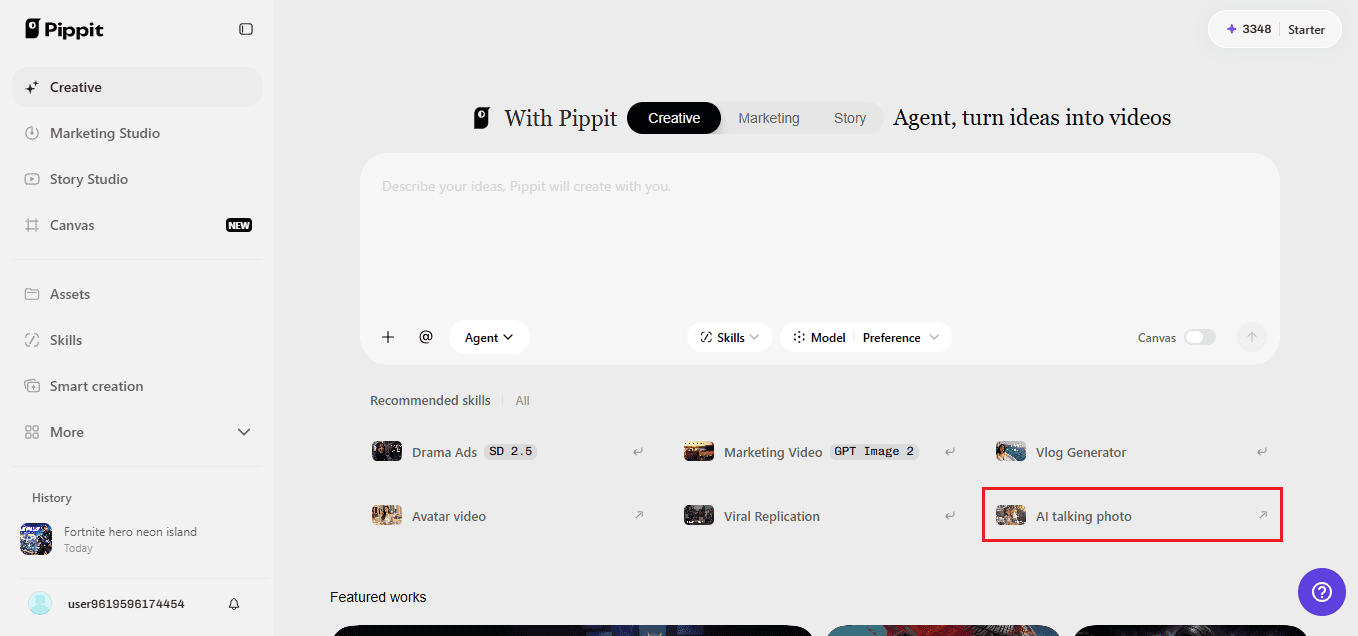
Choose the AI tool that animates a picture with speech and drop in your avatar by clicking the upload box or dragging the file over. Anything under 256×256 pixels won’t pass, so check the size first. Tick the confirmation that you have permission to use the image, then continue with Next.

Step 2: Give the metal a voice
Select Read out script and write your host’s lines. Set the language, audition a few voices until one sounds right, and pick a caption style if you want text on screen. Save your choices. Want something more personal? The Upload audio clip tab accepts your own recording, and there are trending clips to borrow as well.

Step 3: Send it out
Hit Export, rename the video, and decide what to do with the watermark. Adjust resolution, quality, frame rate, and format to match your platform, then press Download. Your finished host clip is now on your device.

Scripting the shape-shift
A transformation host needs lines built around change. Open with a hook, announce what’s about to shift, and then deliver the payoff right after the melt. Something like: “You’re about to see this look completely change. Watch closely.” Keep each beat to a sentence or two so the pacing stays quick. Use words that suit the material, like smooth, molten, flowing, and sharp. Avoid piling on jargon. And always write the last line first, because knowing the destination keeps the rest of the script from wandering.
Show formats that make use of the melt
Once the host works, you can reuse it everywhere. A weekly show where each episode ends with a new metallic persona gives viewers something to guess. Product teasers also work nicely, with the host liquefying into the item being revealed. Educational channels can use the melt to mark the move between lessons. Music channels might let the host morph into a different outfit for every song. Same base setup each time, different script. That’s what keeps a series sustainable.
Sound design that actually sounds like molten metal
Silent liquid metal looks cool. Liquid metal with the right sound feels expensive. That’s where SeedAudio 1.5 comes in.
Audio that watches your video
Upload a finished clip and the model reads its visual beats, then generates voiceover, atmosphere, and effects timed to match. The splash of a melt gets its sound at the moment it happens.
Everything arrives as separate tracks
Dialogue, ambience, effects, and music come back individually. Too much hiss on the metallic sweeps? Lower that layer without redoing the voice.
Placing sounds by the second
Timestamps let you say when a line or effect should hit, so the shimmer lands exactly as the face collapses.
A whole soundscape from one description
Write the scene out in plain text and you receive voice, foley, effects, and music together, instead of piecing them together from different places.
Final polish before you publish
Before posting, watch your clip twice. The first time, look only at the face and mouth. The second time, listen with your eyes closed to see whether the voice carries the energy on its own. Trim any dead air at the start, because viewers decide within a second or two whether to stay. Keep captions short and high-contrast against the chrome. Check that the final frame leaves a clean look, since that’s often what becomes the thumbnail. If something feels off, change one thing at a time.
Timing the melt to your words
The transformation lands best when the script is built around it. Plan a short pause right before the shape shift, then follow with a line that confirms what changed. Something simple works, like “And that’s a whole new look.” If the melt comes too early, viewers miss the setup. If it comes too late, the energy drops. Mark the exact line where you want the change to happen and write your edit notes beside it. Playing the clip a few times with the sound off will also show you whether the visual rhythm matches the pace of the speech.
Let the chrome do the talking
A liquid metal host sits right between art and entertainment, and you don’t need a VFX team to build one. With Pippit, a single shiny portrait becomes a speaking presenter in a few clicks, and the transformation theme gives your content a signature look. Write your first hook, pick a voice, and let the chrome do its thing. Open Pippit now and turn your avatar into a host worth watching.

Martin Smith is the founder and Editor-in-Chief of St. Louis Restaurant Review, STL.News, USPress.News, and STL.Directory. He is a member of the United States Press Agency (ID: 31659) and the US Press Agency.